Thursday, April 7, 2011

Make Your Website Faster With Page Speed Online from Google: free business tools online

One of the newest tools to hit the market from Google's stable is Page Speed. Its the all new way of speeding up your website. Interestingly its one of the Google labs projects which analyzes any website for its speed and comes up with suggestions for how to improve the same?!

Why website speed?
As internet has now become mainstream and one of the largest platforms for information spreading and consumption, every internet property is to be managed for its performance. Eg: if you run a website which takes more than a minute to properly download even in a broadband connection, then there is an issue with either the website coding OR the design elements or the host. You need to rectify the same asap to let your users engage with your content in the shortest possible time.

Google Page speed: how to use?
The experimental tool is fairly easy to use. Simply type in a website and Google comes back to you with an analysis and suggestions as to how to improve the website speed? The suggestions are intelligently classified in the order of their importance as either high, medium or low. Also Google clearly displays which rules of website optimization is the website already following and which rules must it add onto itself to be optimized for web 2.0.

But did we not have Google PR before?
That's what. Don't confuse Google PR (page rank) with this tool. Google PR is still existing and is a tool which ranks websites on the basis of their search engine presence. One of the major most criteria being hwo many relevant back-links does the website gets from various sources online.

Google page speed is a tool which does not depends upon PR. It merely is a tool which has a focused use in terms of assessing the speed of a web page and hwo to further improve upon the same.

Where can I get Google Page Speed?
To use this tool, click here.


Google Page Speed as per the above screen capture shows the various suggestions for the website that we have taken as an example here in this case. The left sidebar shows the various suggestions given by the Google page speed tool to further optimize the website:

Clicking on any of the options shown on the left sidebar the right pane shows what exactly needs to be done to optimize the website for optimum performance.

Benefits of this tool for the business?
For any business to engage its customers online, its crucial to reach out to the relevant target audience with the right content at the right time. Google page speed helps you do just that.

To know more about new online business tools drop in a comment to this post.

Wednesday, April 6, 2011

Online Tools to Reduce Down Cost of Customer Service for Your SME

For any Small and Medium Enterprise customer service is a challenge to be addressed. Large businesses can afford to maintain dedicated customer care departments and can hire people to specifically respond to customers on time. For Small and Medium enterprises though, this is a challenge to reckon with.

Many of our partner SMEs have previously posed customer services as one of the major impending operational challenges. For any SME maintaining customer relationships while providing best of class service is difficult.

What is the challenge with Customer Service for SMEs?
The challenge with customer service for SMEs are multiple:

  • sustaining a customer service team dedicated to resolving any issues in time, everytime
  • charting out efficiency of the resolutions
  • taking customer feedback on an on-going basis at all times
  • creating, maintaining and sustaining a proper process for assigning tickets to the relevant customer service professionals in the team
All these are challenges which come associated with customer service as a business objective are tough to be solved by small and emerging companies.

How to create a scalable customer service solution?
Internet again comes to help! There are many tools online which can help you set up a process oriented customer service set-up without much hassles. Depending upon your size, if you are a start-up/ budding organization, you might not even need a dedicated resource to really service your customers.

An online help-desk solution is the answer to all your customer service problems. One such interesting application is Zendesk which is an online help desk software solution. 

What is Zendesk?
Zendesk is a web based help desk software with an inbuilt support ticket system and a self service customer support platform.

Zen Desk works like any other customer service/ support department of an organisation. It creates a virtual (online) customer support for your organisation and helps you address customer complaints while setting a process for the same.

How can I start?
Zen Desk allows a free 30 day trial of their product and hence you can try the product and see its features for free before actually thinking of investing your money for the same. Once you login to your Zen Desk account the first landing page that you reach to is your dashboard which lets you access everything of the software and support multiple clients. Refer the screen capture below to have a look at the dashboard:


You can always customize your customer service online help desk with your own branding (logo, colors) etc. To start with you need to create a pool of knowledge oriented resources for your customers to see as a self help portal. You can do this by clicking on the button called 'forums' at the bottom of the screen.


Once done, you must now start defining rules on the platform, with the help of the 'manage' tab on the top menu.

Once the 'manage' options are set and defined, the platform is ready to be used for extending customer service to the customers online with defined support options.

How does this help SMEs?
For small and medium enterprises such online platforms are a boon as they help in creating a process oriented structure for emerging enterprises to deliver quality customer support services.

To know more on leveraging online tools for business success, drop in a comment to this post OR contact our team of experts at the IndiaMART Knowledge Services!

Tuesday, April 5, 2011

Connect With Relevant Professionals Globally: Using Linkedin Search for Business

How difficult is it, connecting with someone with whom you have probably neither met/ Nor spoken to or with, sitting across seven seas. Eg: how about saying hi to someone for the first time in life who is sitting in an altogether different part of the globe?!

Now how about this 'hi' making your business achieve more?
Such is the power of Linkedin, one of world's largest professional networking online platforms. Eg: if you wish to connect with people all over the world who are relevant to your domain OR you think that a certain individual might be your prospective customer OR you are looking for the best talent in a particular domain in the market on a subject, all you need to do is to use Linkedin search effectively and you will reach your results.

Where do I find Linkedin search and How to use it?


The moment you Log-in to your Linkedin profile, on the top right of the landing page, as part of the top navigation menu bar, you will find a search bar with a by default set option called 'people'. This is shown in the above screen capture.

The Usage:
The search bar has various other options which you can explore by clicking on the drop down arrow option right in front of the 'People' option, as shown in the above screen capture. Hence its not just about connecting with the right people, but you can go ahead and find current updates, Jobs, Companies, Answers (Q&A), See your Inbox and Search for Groups.

Lets start with people:
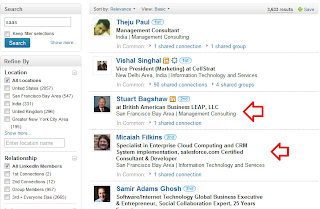
Lets say you need to connect with SaaS professionals in the US, all you need to do simply is write SaaS USA in the box and the same will give you a search result while taking you to the 'Advanced Search' features of the Linkedin search by default.


As shown in the screen capture above. Linkedin search throws search results to your search query and in the first go itself it gives you relevant results which you can work upon.

If you want to further drill down and refine your search criteria, all you need to do is simply use the left side bar of the search pane as shown in the screen capture below:


In real time you can refine your search to US as the Locality OR you can also choose multiple locations at the same time. Further refining your search in terms of the Industry. If you have certain specific preference in terms of SaaS professionals only from a certain industry background, you can do that as well.

There are certain options which have been marked with a Golden color Linkedin logo, these are paid options and you have to be a Linkedin PRO member to access these features, which are worth taking up for any business.

Great, so this way I can also search for companies?
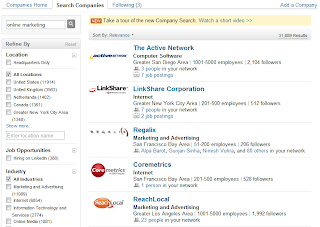
Yes you can! The only thing you need to do is, scroll up and reach the top menu level search bar once again and change the drop down option from 'people' to 'companies'. Once done, you can search for your competitors, do a little market analysis in terms of your competitors globally and keep a tab on their updates while following these companies on Linkedin.


How does this benefit SMEs?
For Small and Medium enterprises Linkedin search is one of the most powerful search engines around as it helps you get connected with the most relevant people in your domain globally and explore various opportunities with them. The same reduces down cost of outreach and time to market for SMEs, which essentially is a major cost factor when it comes to budgeting for by SMEs.

There are many such online tools and powerful ideas to share with for SMEs. To know more how you can use online tools to grow your business to the next level, drop in a comment to this post OR get in touch with our experts at IndiaMART Knowledge Services!

Monday, April 4, 2011

Twitter for Business: How Business Happens in 140 Characters

How impossible it seemed just a few years back to talk, share and collaborate in just 140 characters? How about if we say today doing just this has made twitter a billion dollar venture, at least in their valuation?

Many of our partner Small and Medium Enterprises have previously expressed their inability to understand as to how a simple tool called twitter be used for business? How can talking in just 140 characters help a business grow?

These are critical questions and read on, because this blog post will answer them!

Lets understand what is twitter?
Wikipedia, one of the most trusted sources for any information online says: "Twitter is a website owned and operated by Twitter Inc. which offers a social networking and microblogging service, enabling its users to send and read messages called tweets. Tweets are text-based posts composed of up to 140 characters displayed on the user's profile page. Tweets are publicly visible by default; however, senders can restrict message delivery to just their followers. Users may subscribe to other users' tweets – this is known as following and subscribers are known as followers[8] or tweeps[9] (Twitter + peeps)."

Simply speaking, twitter is a micro-blogging service! Why micro? 'Micro' because of its form. You are allowed to share content/ make status updates to a limit of only 140 characters. Unlike in a blog (like the one you are reading) which is a full text piece of information.

What are tweets?
Tweets essentially is nothing but the 'status updates' you do on twitter.  Just like you have a personal profile on various social networking websites, similarly your profile updates on twitter are called tweets.

How do I create a profile on twitter and login to the same and hmmm, make my first tweet?
Lots of work at once, but lets help you do it. To do your first tweet all you need to do is follow the following process:

  • go to the website: www.twitter.com, which will look something like this
  • If you are new to twitter and need to make your a/c, click on "Sign up" and create your profile by entering the required information as shown in the screen capture below

  • Once you have your account created, sign in with your login information and you will be logged into your account
  • To make your first tweet all that you need to do is write anything within 140 characters in the text box appearing in the Center top of the screen, which also says: What's Happening?
  • While you are doing the update the character count will be displayed below and hence you will be able to keep a check on whether you are keeping within the character limit

So that was about your first tweet!

How can I really leverage the power of twitter for my business?
Twitter is merely an online tool, just like many others. What makes it important to your business actually depends upon your business objectives and whether it is capable of even fulfilling the same or not.

Eg: if your business objective is to connect with users globally who are relevant to your business (if you are a shoe retailer), then you can actually do a global search for users on twitter using keywords like: shoe/ shoes/ shoe retail.

The above search bar shows the search term 'shoes', so lets say you are a shoe retailer/ seller and are interested in knowing people who are talking about shoes on twitter, you can do it by doing a simple search on twitter for the keyword: shoes.

Twitter also automatically gives you suggestions for which are the relevant profiles that you should follow for the topic of your interest/ relevance.

This is just one of the business benefits. You can essentially connect with many relevant people globally in your domain. One of the biggest benefits of twitter is to drive relevant traffic to your website.

We shall soon be featuring top twitter tools for making your life easier with twitter!!

If you wish to know more on leveraging online tools for your business, our team of experts at IndiaMART Knowledge Services will be happy to help. Drop in a comment to this post OR contact us on our website: www.indiamart.com!


Sunday, April 3, 2011

Time Your Tweets: Increase Productivity While Sharing Your Content Online

Time is money. So say everyone. Many of our partner Small and Medium Enterprises are one with this thought. But many get confused when it comes to working online. Since the introduction of Social Networking into the life of the office goer, the working culture and ways have changed. Productivity is taking a new meaning with online tools and business applications taking over the working environment.

So how do we increase productivity while tweeting?
Great, so we understand twitter well. But how to increase productivity while tweeting is a challenge. No business can really invest dedicated time in just tweeting about the various happenings and events everytime they happen. Also, since there is no strict and well defined return on investment, many businesses are unable to create a resource V/s return equation which further hampers the introduction and inclusion of online business tools in the mainstream business.

What's the issue with twitter?
Twitter though is an interesting tool but establishing productivity on the same is a challenging task. Many businesses claim that 140 characters cannot fetch you any objectives and hence treat twitter as just another fun tool. On the other hand the more serious of the pack who understand the importance of these online tools have leveraged the power of talking swift within 140 characters.

Time your tweets and be online, taking to your target audience, even while you are offline!
The more intelligent way to leverage the power of the online tool: twitter is to time your tweets. When we say time your tweets, we simply mean: you can wake up in the morning and time your tweets about whatever you think you are going to talk about to your target audience through-out the day and the tweets will keep happening automatically at the time punched in the morning, without you even being online.

Interesting, so you mean I can be online, while not being online?
YES! you can be online and keep talking to your target audience while you are offline. But how do I do it? There are several ways of doing this, one of the easiest being, using a twitter client called: tweetdeck.

Tweetdeck is one of the many available twitter clients, which makes accessing twitter an easy game. Tweetdeck is an Adobe Air based application and hence gets installed on your local machine while being connected online, helps you access any number of twitter accounts at the same time.


The screen capture above shows a LIVE version of tweetdeck. The application can be downloaded here.

So how do I time my tweets here?
Its Simple! All you have to do is write your tweet in the status section of tweetdeck and press the 'watch' button on the right bottom of the status bar as shown in the screen capture!


Enter the time in the format as shown in the screen capture and you are done. Yes its that simple. After you time your tweets, you can log off and be rested. While you are going through your day your tweets will keep getting posted online without you being actually physically present online for the same.

This way you can keep sharing and spreading your content to the relevant target audience online through twitter and to multiply this effort, you can not only do this from one twitter account, but do it with several twitter accounts which have been configured with tweetdeck.

SMEs can take good advantage of such tools while maintaining and increasing their operational productivity online.

To know more drop in a comment to this post and our team of experts at IndiaMART Knowledge Services will be happy to help!

Saturday, April 2, 2011

PagePlus: the Free Desktop Publishing Software

For Small and Medium Enterprises its an imperative to keep in control the operational costs. The working capital requirements have to be smartly controlled to ensure that the business uses capital in a manner which is well defined and smart.

Challenge for the SMEs
The one challenge for the SMEs is intelligently controlling costs of marketing. While you start your own business or while you are scaling up, marketing is one essential which not only helps a business reach out to the relevant target audience, but also, it helps in taking business to the next level of growth. Client acquisition is one of the direct resultants of good and engaging marketing.

But SMEs don't have budgets enough to leverage all sorts of media and channels to reach out to their target audience.

Free software helps!
FreeSerifSoftware has launched PagePlus, which is a free desktop publishing tool:
What can the PagePlus do for you?
Being a free software in no way categorizes PagePlus to be lesser than the others available. The starter edition of this software is 100% free and is available for download, right HERE.

The various features of this Desktop Publishing Software are:
  • Intuitive and easy-to-use tools
  • Easy drag-and-drop design method
  • Accurate text handling to create professional documents
  • Sticky guides for exact alignment of objects
  • Support for common image files like .JPG and .PNG
  • Create stunning projects for print in minutes
You can create, sophisticated documents, eye catching graphics and effects, with powerful word processing. The software allows you to design quick and easy brochures, flyers and other marketing collaterals for your business. You can quickly create many business cards designs, posters, newsletters etc. and to top it all, you do not have to be a super technology champion to create fantastic looking marketing collaterals.

How do I get this software?
All you need to do is to download this PagePlus on your desktop from the link given above. Once done, you are ready to use this software to create great looking marketing collaterals for your emerging business for free.
After logging in, you need to activate your account, as Serif takes your Email Id. Once you are done, you will be good to go.

How does it help my emerging business?
Greatly! While you are able to save cost of creating marketing collaterals, you are wisely and intelligently using your capital and saving them while still creating fantastic marketing initiatives for your business to reach out to the relevant target audience. These flyers, newsletters etc. can further be used through email marketing to take your message out to the relevant target audience and also engage them towards creating new business.

There are many such online platforms available, which are benefiting the Small and Medium Enterprise segment. To know more, get in touch with the experts at IndiaMART Knowledge Services. Do drop in a comment to this post to let us know what else would you want us to share about!

Friday, April 1, 2011

Your Business Queries Answered by Experts Globally for Free: LinkedIn Answers made simple for SMEs

Running an emerging company is a tricky path to tread. Moreso if you are a first generation entrepreneur. You need a constant source of information, help and mentoring at just the right times from the relevant people. Also you need to learn from the business mistakes committed by similar businesses and learn from them.

Challenge for SMEs
But all all of this needs time and a focused effort on many fronts which again is a challenge for the SMEs.

How to then get across to the relevant people who could help solve business issues?
Let us add How to then get across to the relevant people who could help solve business issues for free?! Though there are several online platforms existing which promise you great mentoring by industry leaders and the rest, while you are an emerging business, you need the right advice from people who have done it on ground and have a first hand experience of the same.

This is what is available on Linkedin Answers!
Linkedin is one of the world's largest professional social networking platform. You can freely create a professional profile and share it with the world. It is also free to connect with people globally for professional purposes. One of the greatest advantages of Linkedin is that you can create winning professional profiles, which can not just help you create your next career move but also find business leads.

But professional networking is not just limited to connecting with people globally, it is also about getting he right advice from the relevant people at times when you need them the most.

How to access Linkedin answers?
Its fairly simple to get some of the perlplexing questions you have, answered by experts.

The screenshot above shows how to access Linkedin answers. All you need to do after logging into your Linkedin profile is to navigate the top menu and under the more drop down menu the first option that you will get in "Answers".

How to use Linkedin answers?
Lets do it LIVE here! After you reach the Linkedin answers application, you will see the following home page:

Whatever question that you need to ask write it in the "Ask Question" box: eg:


Once you have keyed in the question, click the next button. If you want to add any extra details to your question, you can in the "Add Details" box.

The critical thing you must do is "Categorize" your question. Categorizing your question ensures the fact that your question is queued up under the right category which will ensure that your question reaches the relevant target audience.

Is my question limited to only my network on Linkedin?
Once you categorize this question, it will go not only to your network of professional connects but will also reach out to the professionals which are relevant to the category you have classified your question under.

Once you are done, click "Ask Question" at the bottom of the page. Here you will get the option for sharing your question with your personal network of experts, which means: if you feel you have some professionals in your network who are relevant to your question, you can send the question personally to them.

Select the experts from your network and "Send" the question to them. Once you are done, your question is now available LIVE on Linkedin to be answered by relevant people from across the globe.

Can my question be indexed by search engines for many more people to see?
YES! The best part about Linkedin questions is that once you ask your question it quickly gets indexed by search engines like Google and hence can be found and answered by many more people across the globe.

Can I rate the best answers to my question(s)?
Yes you can! Linkedin allows you to rate the best answers to your questions by experts, which also is a good way to connect with such experts globally. 

Can I answer some questions as well?
Yes! in your network the questions that you see on your status update wall and under the answers section, you are free to answer those questions if you have the know how of the same. As people start liking your questions and rating them, you can also be quickly classified as one of the top experts, which Linkedin changes every week:

For SMEs this is a great tool as it helps them get connected to the experts in various domains globally while sitting in the comfort of their offices. This helps them reduce cost and increase productivity while getting views from global experts. To know more drop in a comment to this post and our team of experts at IndiaMART Knowledge Services will be happy to extend possible help!